KP – Simulation – Double Tracking & Tight
1 min read
Double Tracking #
Enhances depth, scale, and realism by layering two independently recorded ensemble performances. Natural timing and spatial differences between the layers create a richer, more complex, and dynamically lifelike sound.
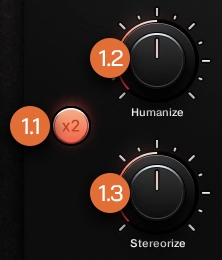
Double Tracking Toggle #
Enables or disables Double Tracking. When active, it layers a second set of samples, effectively doubling the ensemble size and enhancing, depth, width and overall impact.
Humanize Knob #
Introduces subtle, randomized but musically controlled timing variations between the double-tracked layers. Higher values create a flammed effect, simulating the natural timing inconsistencies of live ensemble performance.
Stereorize Knob #
Adjusts the stereo spread between the double-tracked layers. Higher values increase the perceived width, creating a broader and more immersive spatial image.
Tight #
Defines the timing behavior of sample playback, balancing sharp, immediate response with the preservation of natural transients and detail.
Tight Toggle #
Switches between two timing modes:
Tight (On)
Disables pre-roll by setting it to 0 ms for an immediate, tight, and direct response, sacrificing some natural attack in favor of a more focused, punchy sound without latency.
Loose (Off) (Default)
Enables a consistent 41 ms pre-roll, preserving the natural transients and microdetail of the samples. Adds 41 ms of latency, which must be compensated for in the DAW.