
KP – Simulation – Delay & Reverb
1 min read
Delay & Reverb #
The Delay and Reverb panel includes two key effects that enhance the overall sound through temporal and spatial processing. Applied to the final output, these effects shape the mix’s sense of space, depth, and motion.
FX Configuration Toggle #
Toggle to open or close the FX configuration panel, where Delay and Reverb parameters can be adjusted.
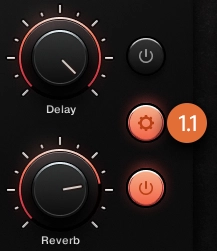
Delay #
The Delay effect creates repeating echoes of the input signal, adding a sense of depth, rhythm, and space. It can range from tight, rhythmic delays to expansive echo patterns, depending on its settings.

Delay On/Off Toggle #
Toggle to enable or bypass the Delay effect, allowing for quick comparison with and without delay processing.
Delay Amount Knob #
Adjust the mix level of the Delay effect, balancing the dry (original) and wet (delayed) signal. Higher values result in more prominent echo presence in the sound.
Delay Time Knob #
Adjust the time between delay repetitions. Short times create tight, slapback effects, while longer times produce slower, more spacious echoes.
Delay Tempo Sync Button #
Toggles synchronization of the Delay Time to the host’s tempo, enabling musical subdivisions (e.g., quarter-note, eighth-note delays) that follow the project’s rhythm.
Delay Feedback Knob #
Adjusts how much of the delayed signal is fed back into the input of the effect. Higher feedback values create longer, repeating echoes; very high settings can lead to self-oscillation or dense delay tails.
Delay LP/HP Knob #
Adjusts the frequency content of the delay repetitions. The low-pass filter (LP) rolls off high frequencies, producing darker echoes, while the high-pass filter (HP) removes low frequencies for a thinner, brighter delay effect.
Reverb #
The Reverb effect simulates the natural reflections of sound in physical spaces, from small rooms to vast halls. It adds depth and dimensionality to the sound, making it feel more immersive and spatially realistic.

Reverb On/Off Toggle #
Toggle to enable or bypass the Reverb effect, allowing for direct comparison of the sound with or without reverberation.
Reverb Amount Knob #
Adjust the balance between the dry signal and the reverb-processed signal. Higher values produce a more enveloping, atmospheric sound.
Reverb Time Knob #
Controls the decay duration of the reverb tail. Short times simulate smaller spaces, while longer times emulate large, resonant environments.
Reverb Damping Knob #
Adjusts the absorption of high frequencies in the reverb tail. Higher damping values result in a warmer, darker reverb as high frequencies decay faster.
Reverb Modulation Knob #
Introduces subtle pitch modulation to the reverb reflections, adding movement and richness. This helps avoid static or metallic-sounding tails and enhances perceived depth.